Notwendig
Immer aktiv
Session, Sicherheit und Login-Funktionen.
Aktuelle Dokumentation der ALICE Plattform.
Diese Visualisierung zeigt, welche Daten bei einer Prompt-Anfrage intern verarbeitet und ggf. extern uebertragen werden.
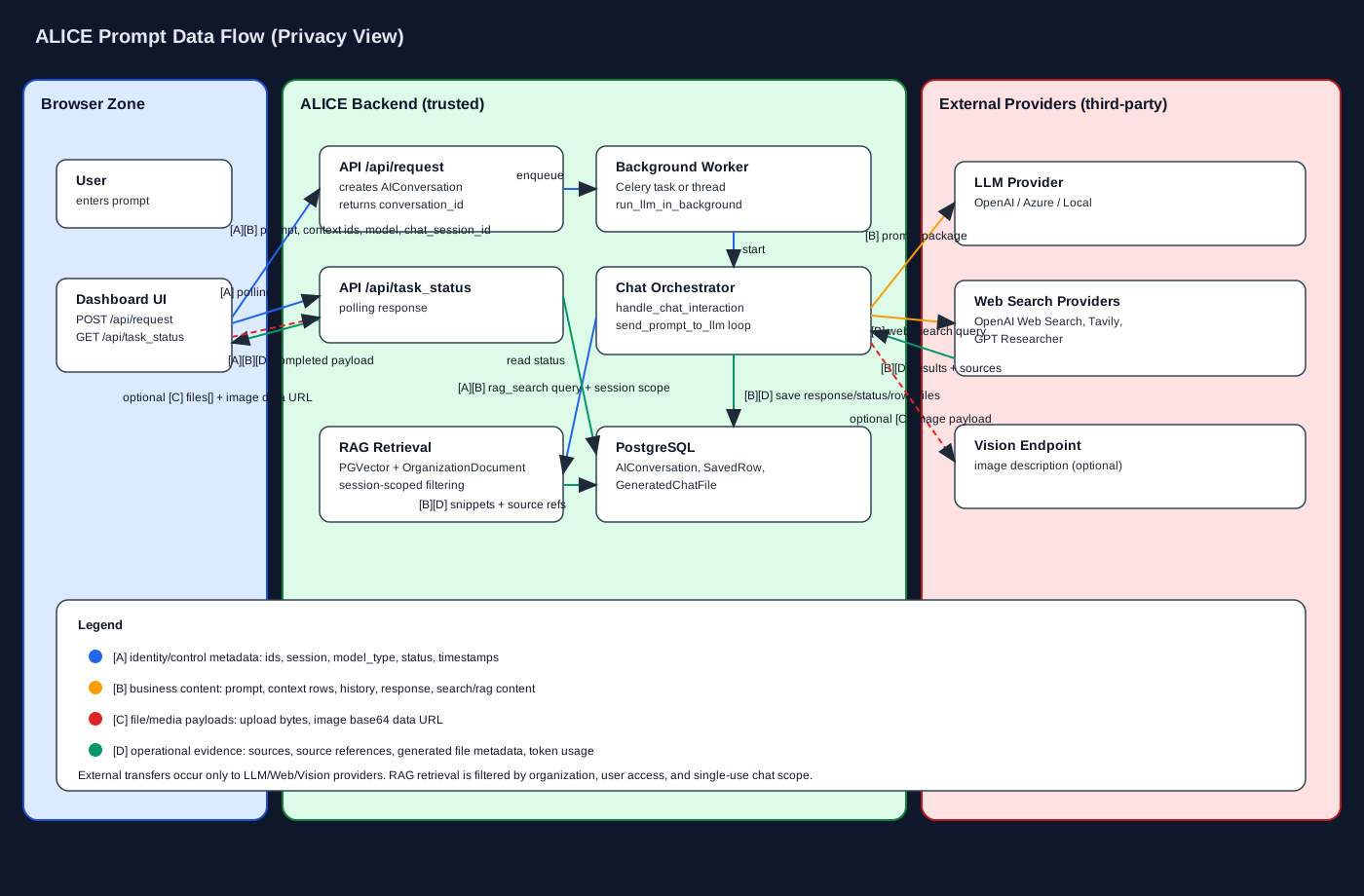
Kompakte Uebersicht ueber Datenklassen, Transfer- und Speichermatrix fuer Datenschutzpruefungen.
Datenklassen-Dokument oeffnenDas Dashboard ist Ihre Kommandozentrale. Hier interagieren Sie mit ALICE über ein Chat-Interface. Der Prozess ist in drei Phasen unterteilt:
Beschreiben Sie Ihr Anliegen so präzise wie möglich. ALICE versteht den Kontext.
Beispiel: „Erstelle eine Marktanalyse für CRM-Systeme im DACH-Raum.“
Falls Informationen fehlen, stellt ALICE gezielte Rückfragen (gelbe Box). Sie müssen diese beantworten, bevor die Analyse beginnt. Dies sichert die Qualität.
ALICE liefert strukturierte Ergebnisse mit expliziten Feldern (z. B. Anbieter, Thema, Bewertung, Vorteil/Nachteil, Datum, Quelle, Details). Diese werden automatisch in Ihrer Historie gespeichert und sind als einzelne Felder abrufbar.
Standard-Antworten basieren auf dem internen Wissen der KI. Mit der Deep Dive Funktion können Sie ALICE beauftragen, das Live-Internet zu durchsuchen.
Sie können eigene Dokumente hochladen, damit ALICE diese in die Antworten einbezieht. Dies ist ideal für die Analyse von Verträgen, Richtlinien oder internen Berichten.
Der Supplier Sentinel ist Ihr proaktives Risiko-Radar. Er überwacht automatisch ausgewählte Lieferanten oder Themen im Hintergrund.
Erstellen Sie mit einem Klick strategische Vorbereitungsunterlagen für Verhandlungen.
Generiert ein professionelles PDF mit Strategie, Argumenten und Taktiken.
Nutzen Sie den interaktiven Modus für Just-in-Time-Coaching während der Verhandlung.
Mit Workflows strukturieren Sie komplexe Aufgaben als Kartenfolge mit Zuständigkeiten, Status und Abschlussreport. Durchläufe (Runs) werden asynchron ausgeführt, sodass die Verarbeitung weiterläuft, auch wenn Sie die Seite verlassen.
Im Bearbeitungsmodus können Karten per Drag-and-Drop neu sortiert werden, um die Reihenfolge ohne Neuladen anzupassen.
In der linken Seitenleiste finden Sie kompakte Chat-Sitzungen (Sessions) mit dem letzten Stand und Schnellzugriff.
Teilen Sie Ihre Erkenntnisse mit Stakeholdern.
Das Community Ranking ist ein Ort des Wissensaustauschs. Wenn Sie eine besonders gute Analyse erstellt haben, können Sie diese mit Ihrer Organisation teilen.
Jeder Nutzer gehört zu einer Organisation. Als Admin haben Sie Zugriff auf das Admin-Panel.
| Funktion | Administrator | Mitglied |
|---|---|---|
| Chats erstellen | ||
| Nutzer einladen | ||
| API-Keys verwalten | ||
| Rechnungen einsehen |
Für Entwickler bietet ALICE eine REST-API. Administratoren können im Admin-Panel API-Keys generieren.
Zur API-Dokumentation
ALICE verwendet eine virtuelle Währung („Tokens“), um die Nutzung fair abzurechnen. Alle Nutzer einer Organisation greifen auf denselben Token-Pool zu.
| Aktion | Kosten | Details |
|---|---|---|
| Standard-Chat | 5-20 Token | Einfache Analyse ohne externe Datenquellen. |
| Deep Dive | gemäß Token-Konfiguration | Komplexe Internet-Recherche und Synthese. |
| Dokumenten-Upload | gemäß Token-Konfiguration | Verarbeitung und Indexierung eines Dokuments (organisationsweite oder persönliche Bibliothek). |
| Workflow-Start | wie Deep Dive | Start eines neuen Workflow-Durchlaufs inkl. tokenbasierter Abrechnung. |
| API-Anfrage | gemäß Token-Konfiguration | Anfrage über die externe Schnittstelle. |
Je nach gebuchtem Abo-Plan (Tier) erhält Ihre Organisation monatlich ein neues Kontingent an Tokens.
Die konkrete Höhe hängt vom gebuchten Tarif (Tier) und Ihrer Konfiguration ab.
Sind die Tokens aufgebraucht? Kein Problem. Im Token-Shop können Sie jederzeit Pakete nachkaufen.
Noch Fragen? Kontaktieren Sie unseren Support unter kontakt@mybetterresearch.com